Vale style guide
Vale is a command-line prose linter that enforces writing style rules automatically. This portfolio uses Vale with two rule layers: the Microsoft Writing Style Guide as the base, and a custom NimbusWiz ruleset that enforces the controlled vocabulary and voice decisions defined in the Taxonomy.
Configuration: .vale.ini
StylesPath = styles
MinAlertLevel = suggestion

Packages = Microsoft

[*.md]
BasedOnStyles = Microsoft, NimbusWiz

[*.mdx]
BasedOnStyles = Microsoft, NimbusWiz

[docs/technical-documentation/api-reference/*.md]
BasedOnStyles = Microsoft, NimbusWiz
TokenIgnores = (\x60[^\x60]+\x60)

# AI experiments: first-person voice and passive voice are deliberate case-study register
[docs/ai-experiments/*.md]
Microsoft.FirstPerson = NO
Microsoft.Passive = NO

# Persona pages: first-person internal perspective; passive voice is narrative
[docs/information-architecture/personas/*.md]
Microsoft.FirstPerson = NO
Microsoft.Passive = NO

# Journey maps: pedagogical 'we' is appropriate; passive voice is narrative
[docs/information-architecture/journey-maps/*.md]
Microsoft.We = NO
Microsoft.Passive = NO

# IA discussion pages: same rationale as journey maps
[docs/information-architecture/*.md]
Microsoft.We = NO

# Technical documentation: DevOps audience; API terms, system passives, URLs are correct style
[docs/technical-documentation/**]
Microsoft.HeadingAcronyms = NO
Microsoft.GeneralURL = NO
Microsoft.Passive = NO
Microsoft.Vocab = NO
Microsoft.SentenceLength = NO

# Knowledge base (FAQ format): first-person headings and question marks are intentional
[docs/technical-documentation/knowledge-base/*.md]
Microsoft.FirstPerson = NO
Microsoft.HeadingPunctuation = NO

[CHANGELOG.md]
BasedOnStyles = Vale
MinAlertLevel = suggestion means Vale surfaces everything: suggestions, warnings, and errors, not just hard failures.
Per-directory overrides suppress Microsoft rules where they conflict with deliberate stylistic choices.
For portfolio narrative pages (case studies, personas, journey maps, IA discussion), Microsoft.FirstPerson, Microsoft.We, and Microsoft.Passive are suppressed where first-person voice, pedagogical "we", or passive voice is intentional.
For technical documentation, several Microsoft rules are tuned out at the directory level: Microsoft.HeadingAcronyms would flag legitimate API terms, Microsoft.GeneralURL flags valid URLs in code samples, Microsoft.Passive flags system-state descriptions ("the deployment is queued") that read more naturally in passive voice, Microsoft.Vocab blocks legitimate product terms not in its dictionary, and Microsoft.SentenceLength is over-tight for procedural copy that needs full context per step.
For the knowledge base, Microsoft.FirstPerson and Microsoft.HeadingPunctuation are suppressed because FAQ format uses first-person question headings ending in ? ("Where do I find my API key?"), which the rule otherwise flags.
Microsoft Writing Style Guide base
The Microsoft package provides rules for:
- Passive voice detection
- Contractions (Microsoft style allows them, and this enforces consistent use)
- Comma usage and punctuation
- Heading and list formatting
- Redundant phrases (
in order to,due to the fact that) - Bias-free language
The package installs automatically via vale sync when the pipeline runs.
NimbusWiz custom rules
Custom rule files live in styles/NimbusWiz/. I migrated the NimbusWiz-specific product name exceptions (NimbusWiz, Modernization Advisor, GitHub, CI/CD, etc.) to Microsoft.Headings.
Substitutions.yml: Controlled vocabulary
Enforces the preferred terms defined in the taxonomy. Examples:
| Flagged term | Preferred term | Level |
|---|---|---|
user manual | user guide | Warning |
the Advisor | the Modernization Advisor | Warning |
quirk engine | Quirk Intelligence | Warning |
please click | click | Warning |
it is possible to | you can | Warning |
When Vale flags a substitution, it suggests the correct replacement inline in the PR review comment. Fixing it's a one-click action in the GitHub UI.
WeakVerbs.yml: Direct instruction enforcement
Flags weak constructions that soften instructions unnecessarily:
you can click    → click
you can select   → select
simply click     → click
feel free to     → [remove]
go ahead and     → [remove]
This reinforces the second-person-with-context voice: "To X, click Y," not "You can click Y if you want to X."
Running Vale locally
To run Vale before pushing:
# Install Vale (macOS)
brew install vale

# Install the Microsoft package
vale sync

# Run against all docs (*.md only - avoids MDX parser errors)
vale --glob=*.md docs/

# Run against a single file
vale docs/technical-documentation/user-guide/getting-started.md
Example output:
docs/technical-documentation/user-guide/getting-started.md
 47:18  warning  Use 'user guide' instead of 'user manual'.          NimbusWiz.Substitutions
 89:1   suggestion  'You can click' is a weak construction.          NimbusWiz.WeakVerbs
The --glob=*.md flag matters. Without it, Vale attempts to lint .mdx files and fails with a parser error (E100 [lintMDX] Runtime error) because mdx2vast isn't available in the GitHub Actions runner.
CI workflow scope
The GitHub Actions workflow (vale.yml) runs Vale on every push and pull request to master, scoped to docs/technical-documentation/ only:
files: docs/technical-documentation/
The scope is intentional. Persona pages, journey maps, and AI experiment pages use first-person voice, passive voice, and narrative "we" deliberately. Those directories have per-directory overrides in .vale.ini. Scoping CI to technical-documentation/ keeps the PR check focused on the content where style consistency matters most: the instructional docs a real NimbusWiz user would read.
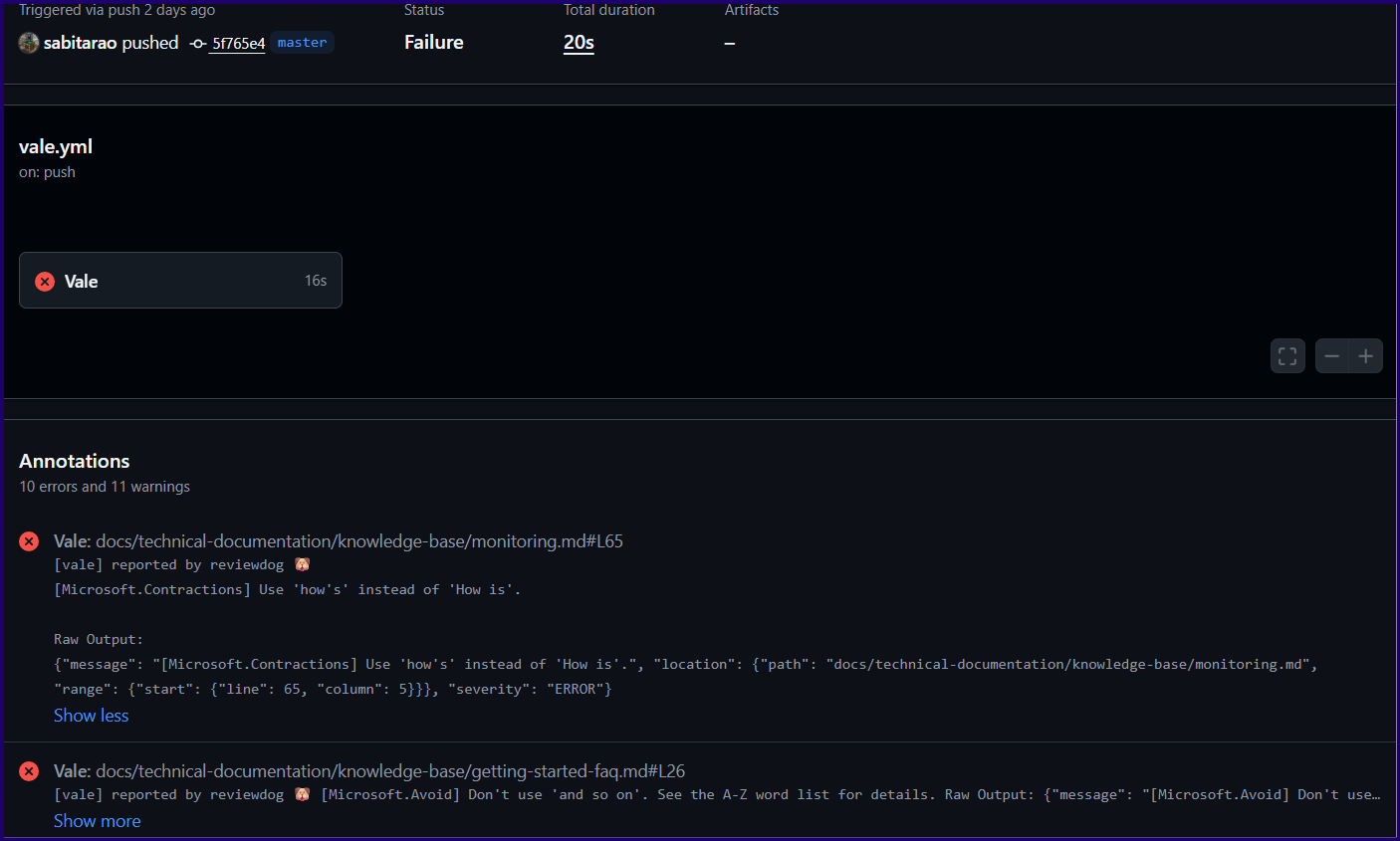
Vale workflow in GitHub
To check the full portfolio locally:
vale --glob=*.md docs/
To replicate the CI check exactly:
vale --glob=*.md docs/technical-documentation/
Vale as a teaching tool
Beyond enforcement, Vale guides contributors who haven't read the taxonomy. A new contributor will receive inline feedback on every PR. The style guide becomes self-documenting.
With automated style enforcement, the rules don't need to be memorised; they're surfaced exactly when and where they're needed.