AI draft generation
This portfolio uses scripts to generate documentation stubs by calling the Anthropic API and returning correctly-structured doc stubs in Markdown.
Before you begin
- You need a valid
ANTHROPIC_API_KEY. Both scripts useclaude-opus-4-5. - For GitHub Actions: add the key under Settings → Secrets and variables → Actions → New repository secret. Name it
ANTHROPIC_API_KEY. - For local use: install Node.js (v18+) and run
npm installin the repo root to install@anthropic-ai/sdk.
generate-draft.js
The baseline script. It calls the Anthropic API with a system prompt (excluded in the screenshot below) that encodes the NimbusWiz product context, controlled vocabulary, voice guidelines, and content type structures. With four inputs, it returns a correctly structured Markdown stub, writes the file to docs/{section}/{slug}.md, creates a new branch, and opens a PR with a pre-flight checklist.
Use this script when you don't have access to the prototype source, or when you're drafting a concept or reference page where specific UI steps aren't the focus.
Click to view the code snippet
/**
 * generate-draft.js
 *
 * Generates a structured documentation draft using the Anthropic API.
 * Called by the ai-draft.yml GitHub Actions workflow.
 *
 * Usage (local):
 *   ANTHROPIC_API_KEY=your_key \
 *   PAGE_TITLE="Configure alert thresholds" \
 *   SECTION="admin-guide" \
 *   CONTENT_TYPE="guide" \
 *   AUDIENCE="system-admin" \
 *   node scripts/generate-draft.js
 */

if (!pageTitle || !section || !contentType || !audience) {
  console.error('Missing required environment variables: PAGE_TITLE, SECTION, CONTENT_TYPE, AUDIENCE');
  process.exit(1);
}

const slug = pageTitle
  .toLowerCase()
  .replace(/[^a-z0-9\s-]/g, '')
  .replace(/\s+/g, '-')
  .replace(/-+/g, '-');

const outputPath = path.join(
  'docs', 'technical-documentation', section, `${slug}.md`
);

const systemPrompt = `...
Output ONLY the markdown file content. No preamble, no explanation.`;

const userPrompt = `Generate a draft documentation page with these parameters:

- Title: ${pageTitle}
- Section: ${section}
- Content type: ${contentType}
- Primary audience: ${audience}
...
`;

async function generateDraft() {
  console.log(`Generating draft: "${pageTitle}" → ${outputPath}`);

  const message = await client.messages.create({
    model: 'claude-opus-4-5',
    max_tokens: 2000,
    system: systemPrompt,
    messages: [{ role: 'user', content: userPrompt }]
  });

  const content = message.content[0].text;

  const dir = path.dirname(outputPath);
  if (!fs.existsSync(dir)) {
    fs.mkdirSync(dir, { recursive: true });
  }

  fs.writeFileSync(outputPath, content, 'utf8');
  console.log(`Draft written to: ${outputPath}`);
  console.log(`Input tokens: ${message.usage.input_tokens}`);
  console.log(`Output tokens: ${message.usage.output_tokens}`);
}

generateDraft().catch(err => {
  console.error('Draft generation failed:', err.message);
  process.exit(1);
});
What it produces:
- Correct frontmatter with all required fields
- Appropriate heading hierarchy for the content type (guide, reference, or concept)
- Placeholder markers where product-specific content is needed
- A "Before you begin" section and "Next step" link for guide content
- Controlled vocabulary from the NimbusWiz taxonomy pre-applied
What it doesn't produce:
- UI-accurate procedure steps
- Verified technical details
- Final prose ready to publish
The placeholder markers are specific by design, and tell the reviewer exactly what to look up and why the gap exists.
Run locally
ANTHROPIC_API_KEY=your_key \
PAGE_TITLE="Configure alert thresholds" \
SECTION="admin-guide" \
CONTENT_TYPE="guide" \
AUDIENCE="system-admin" \
node scripts/generate-draft.js
Run via GitHub Actions
- Go to Actions → AI draft generation in the repository.
- Select Run workflow.
- Fill in the four inputs: page title, section, content type, audience.
- Select Run workflow.
- The workflow creates a new branch and opens a PR within approximately 60 seconds.
- Review, edit, and complete the checklist before merging.
Sample screenshots
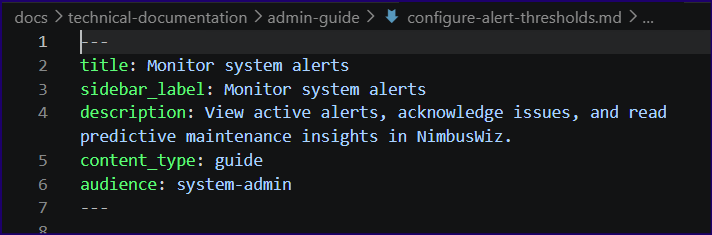
Auto-generated frontmatter
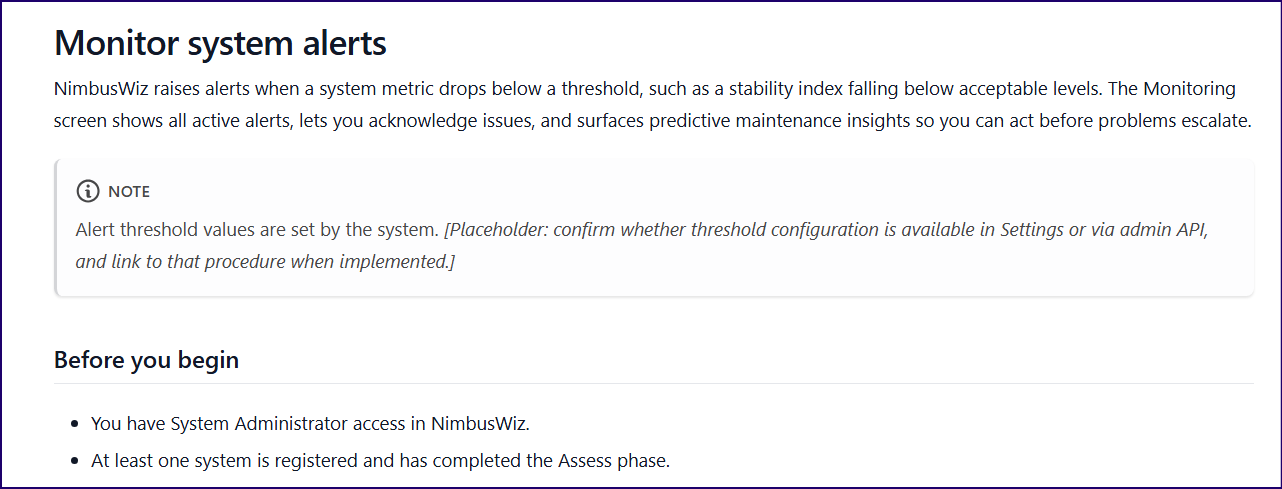
Detailed placeholder requiring further action
generate-draft-with-prototype.js
The enhanced script. Before calling the API, it reads the actual React component files from the prototype source. The system prompt includes real UI structure, and the model generates steps based on what's actually implemented rather than a baked-in product description.
Use this script when you have prototype access and are drafting a guide that describes specific UI interactions.
Specify which components to load with the COMPONENT_HINTS environment variable (comma-separated component names without .tsx). The script always loads Root.tsx for navigation labels. If you omit hints, it auto-detects components by matching filenames against keywords in the page title.
Click to view the code snippet
/**
 * generate-draft-with-prototype.js
 *
 * Enhanced version of generate-draft.js that reads NimbusWiz prototype
 * component source files to generate UI-accurate documentation drafts.
 *
 * Compared to generate-draft.js, this script:
 *   - Reads specified React component files from the prototype source
 *   - Includes real UI structure in the generation prompt
 *   - Produces steps based on actual nav labels, buttons, and panels
 *   - Flags missing features explicitly rather than inventing UI elements
 *
 * Usage (local):
 *   ANTHROPIC_API_KEY=your_key \
 *   PAGE_TITLE="Monitor system alerts" \
 *   SECTION="admin-guide" \
 *   CONTENT_TYPE="guide" \
 *   AUDIENCE="system-admin" \
 *   PROTOTYPE_PATH="/path/to/nimbuswiz-demo/src" \
 *   COMPONENT_HINTS="Monitoring,Settings" \
 *   node scripts/generate-draft-with-prototype.js
 *
 * Environment variables:
 *   PROTOTYPE_PATH    Path to the prototype src/ directory (required)
 *   COMPONENT_HINTS   Comma-separated component names without .tsx extension (optional).
 *                     If omitted, the script auto-detects components whose filenames
 *                     match keywords in PAGE_TITLE.
 */

const Anthropic = require('@anthropic-ai/sdk');
const fs = require('fs');
const path = require('path');

const client = new Anthropic({ apiKey: process.env.ANTHROPIC_API_KEY });

const pageTitle     = process.env.PAGE_TITLE;
const section       = process.env.SECTION;
const contentType   = process.env.CONTENT_TYPE;
const audience      = process.env.AUDIENCE;
const prototypePath = process.env.PROTOTYPE_PATH;
const componentHints = process.env.COMPONENT_HINTS
  ? process.env.COMPONENT_HINTS.split(',').map(s => s.trim())
  : [];

if (!pageTitle || !section || !contentType || !audience) {
  console.error('Missing required environment variables: PAGE_TITLE, SECTION, CONTENT_TYPE, AUDIENCE');
  process.exit(1);
}

if (!prototypePath) {
  console.error('Missing required environment variable: PROTOTYPE_PATH');
  process.exit(1);
}

const componentsDir = path.join(prototypePath, 'app', 'components');

if (!fs.existsSync(componentsDir)) {
  console.error(`Components directory not found: ${componentsDir}`);
  process.exit(1);
}

/**
 * Load component source files.
 * Uses COMPONENT_HINTS if provided; otherwise auto-detects by matching
 * page title keywords against component filenames.
 */
function findComponents() {
  if (componentHints.length > 0) {
    const found = [];
    for (const name of componentHints) {
      const filePath = path.join(componentsDir, `${name}.tsx`);
      if (fs.existsSync(filePath)) {
        found.push({ name, content: fs.readFileSync(filePath, 'utf8') });
        console.log(`Loaded component: ${name}.tsx`);
      } else {
        console.warn(`Component not found: ${name}.tsx — skipping`);
      }
    }
    return found;
  }

  // Auto-detect: match component filenames against page title keywords.
  // Ignore short words (3 chars or fewer) to avoid noise.
  const keywords = pageTitle
    .toLowerCase()
    .replace(/[^a-z0-9\s]/g, '')
    .split(/\s+/)
    .filter(w => w.length > 3);

  const allFiles = fs.readdirSync(componentsDir).filter(f => f.endsWith('.tsx'));
  const matched = allFiles.filter(f =>
    keywords.some(kw => f.toLowerCase().includes(kw))
  );

  if (matched.length === 0) {
    console.warn('No components matched page title keywords. Provide COMPONENT_HINTS for better results.');
    console.warn('Continuing without prototype component context.');
    return [];
  }

  return matched.map(f => {
    const name = f.replace('.tsx', '');
    console.log(`Auto-detected component: ${f}`);
    return { name, content: fs.readFileSync(path.join(componentsDir, f), 'utf8') };
  });
}

/**
 * Load Root.tsx for navigation labels.
 * Always included when present — nav labels are needed for any guide.
 */
function loadRootNav() {
  const rootPath = path.join(componentsDir, 'Root.tsx');
  if (fs.existsSync(rootPath)) {
    return fs.readFileSync(rootPath, 'utf8');
  }
  return null;
}

const slug = pageTitle
  .toLowerCase()
  .replace(/[^a-z0-9\s-]/g, '')
  .replace(/\s+/g, '-')
  .replace(/-+/g, '-');

const outputPath = path.join(
  'docs', 'technical-documentation', section, `${slug}.md`
);

const components = findComponents();
const rootNav    = loadRootNav();
const hasContext = components.length > 0 || rootNav;

/**
 * Build the prototype context block for inclusion in the system prompt.
 */
function buildPrototypeContext() {
  const parts = [];

  if (rootNav) {
    parts.push(`### Root.tsx (navigation structure)\n\`\`\`tsx\n${rootNav}\n\`\`\``);
  }

  for (const { name, content } of components) {
    parts.push(`### ${name}.tsx\n\`\`\`tsx\n${content}\n\`\`\``);
  }

  return parts.join('\n\n');
}

const prototypeContext = buildPrototypeContext();

const prototypeInstructions = hasContext
  ? `## Prototype UI context
...

${prototypeContext}`
  : `## Prototype UI context

No prototype source files were provided or detected. Use *[Placeholder: description]*
markers wherever product-specific UI detail is needed.`;

const systemPrompt = `...`

${prototypeInstructions}

## Output format

Output a complete Markdown file with:
1. Frontmatter: title, sidebar_label, description, content_type, audience
2. A page title (h1)
3. Appropriate structure for the content type:
   - guide: Before you begin → numbered steps → Next step link
   - reference: Tables and definitions
   - concept: Problem → explanation → implication
4. *[Placeholder: description]* markers for content not determinable from source
5. At most one :::note or :::warning admonition if genuinely needed
6. A "Next step" link for guide content types

Output ONLY the markdown file content. No preamble, no explanation.`;

const userPrompt = `Generate a draft documentation page with these parameters:

- Title: ${pageTitle}
- Section: ${section}
- Content type: ${contentType}
- Primary audience: ${audience}

${hasContext
  ? `Base all UI steps and navigation on the prototype source files in the system prompt.
Only describe interactions that exist in those files. If the feature is not implemented,
say so with a placeholder rather than inventing steps.`
  : 'Use placeholder markers wherever product-specific UI detail is needed.'}`;

async function generateDraft() {
  console.log(`\nGenerating draft: "${pageTitle}" → ${outputPath}`);
  console.log(`Prototype components loaded: ${components.length}`);
  console.log(`Root nav loaded: ${rootNav ? 'yes' : 'no'}\n`);

  const message = await client.messages.create({
    model: 'claude-opus-4-5',
    max_tokens: 2000,
    system: systemPrompt,
    messages: [{ role: 'user', content: userPrompt }]
  });

  const content = message.content[0].text;

  const dir = path.dirname(outputPath);
  if (!fs.existsSync(dir)) {
    fs.mkdirSync(dir, { recursive: true });
  }

  fs.writeFileSync(outputPath, content, 'utf8');
  console.log(`Draft written to: ${outputPath}`);
  console.log(`Input tokens:  ${message.usage.input_tokens}`);
  console.log(`Output tokens: ${message.usage.output_tokens}`);
}

generateDraft().catch(err => {
  console.error('Draft generation failed:', err.message);
  process.exit(1);
});
What it adds over the baseline:
- Exact navigation labels sourced from Root.tsx
- Real button names, tab names, and panel names from component source
- Accurate table columns, phase sequences, and status indicators
- Explicit placeholders when a feature isn't found in the loaded components, rather than invented steps
What it still can't produce:
- Whether a feature is implemented or planned (a button renders whether or not the backend is ready)
- Backend behaviour: rollback states, audit logging, confirmation flows
- The correct prerequisite chain and cross-links
- Audience-appropriate next steps
Sample screenshots
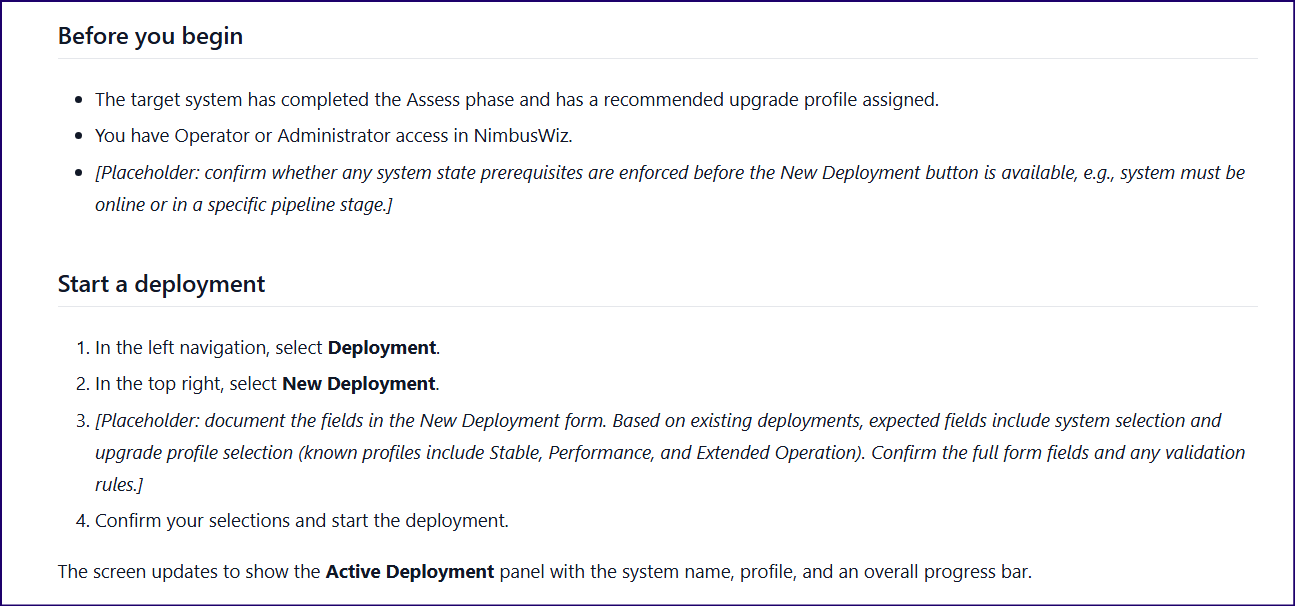
Detailed placeholders requiring design investigation
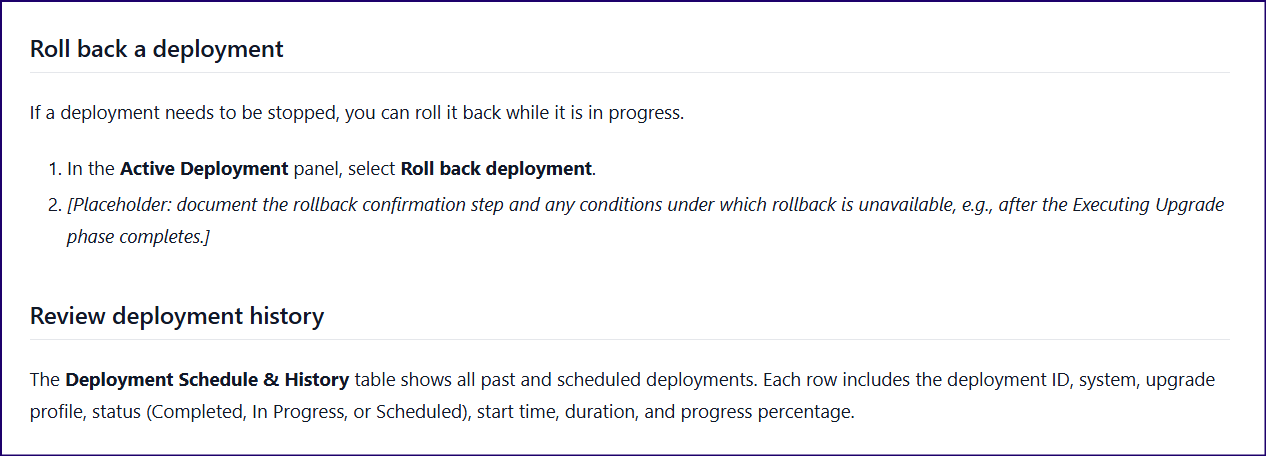
Placeholder requiring backend behaviour investigation
Run locally
ANTHROPIC_API_KEY=your_key \
PAGE_TITLE="Deploy an upgrade profile" \
SECTION="user-guide" \
CONTENT_TYPE="guide" \
AUDIENCE="devops-engineer" \
PROTOTYPE_PATH="/path/to/nimbuswiz-demo/src" \
COMPONENT_HINTS="Deployment" \
node scripts/generate-draft-with-prototype.js
The PR checklist
Both scripts open a PR with this checklist. Nothing merges until a reviewer completes it.
### Before merging

- [ ] Review and edit all `*[Placeholder: ...]*` sections
- [ ] Verify all product term usage against the taxonomy
- [ ] Run Vale locally: `vale docs/`
- [ ] Add to `sidebars.js` if not already present
- [ ] Check all internal links resolve